
Closed preview · no sales yet
Practical offline desktop tools that save time.
AGI TOOLS makes focused Windows apps for everyday jobs with images, PDFs, files and data. The tools on this site are built to run on your own PC: no uploads, no accounts.
Opens @Agitools_ai in Telegram. Nothing can be bought yet.
First tool
ImageBatch Pro
Shrink a whole folder of photos without uploading a single one
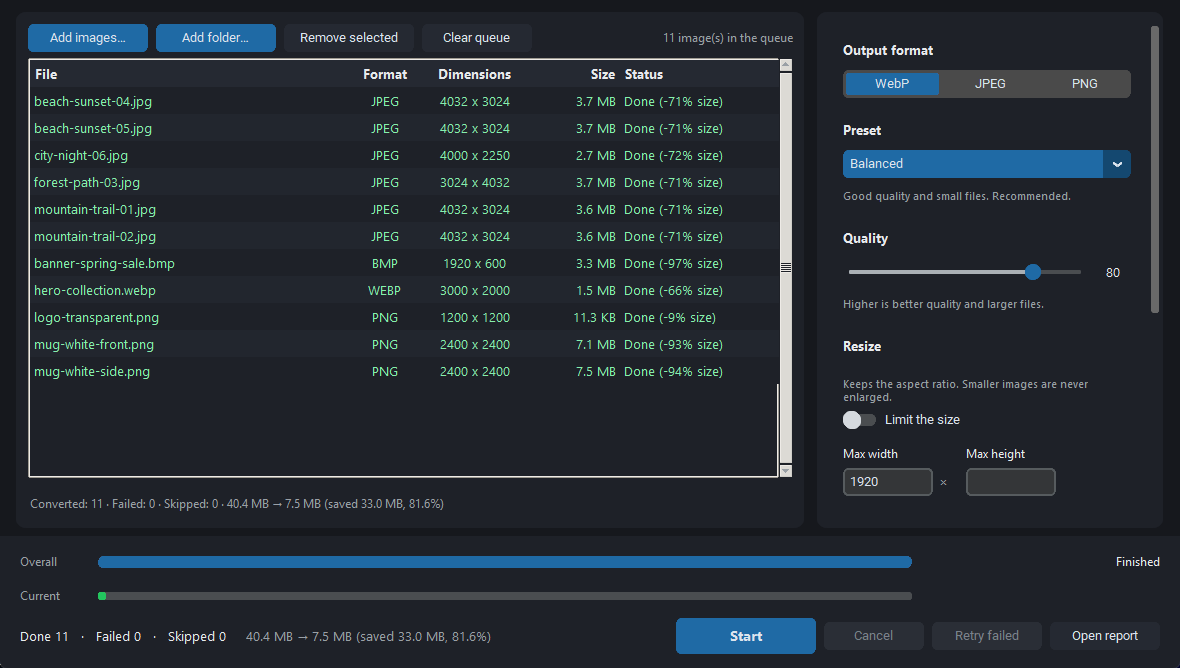
- Converts JPEG, PNG, WebP and BMP to WebP, JPEG or PNG
- Presets: Fast, Balanced (recommended), Maximum compression; adjustable quality
- Optional maximum width and height (aspect ratio kept, never enlarged)
- Drag and drop files and whole folders
Requirements: Windows 10 (22H2) or 11, 64-bit, 4 GB RAM (8 GB recommended)
Internet: Converts images without an internet connection; nothing is uploaded.


Tools
The catalog
16 tools in 5 categories. One is built; the others are working evaluation builds that are still being tested.
Status as of 9 November 2026.
What the labels mean
- Built · not on sale
Built and tested. Sales have not opened, so it cannot be bought or downloaded yet.
- In evaluation
A working evaluation build is being tested. Features and details can still change. It cannot be bought or downloaded.
- On hold
An idea that is not being built at the moment. It may change or never be released.
Image & Media
Convert, clean and prepare photos and graphics on your PC.
-
Built · not on sale
ImageBatch Pro
Batch convert and shrink JPEG, PNG, WebP and BMP images on your PC. Originals untouched, nothing uploaded.
-
In evaluation
EXIF Cleaner
Inspect and remove hidden photo metadata (GPS location, camera, dates) from many images at once, offline.
-
In evaluation
Duplicate Image Finder
Find identical, resized and re-saved copies of your photos, keep the best one and move the others aside, never deleting.
-
In evaluation
Social Resize Pro
Resize and crop images for social networks with ready presets and an approximate safe-area preview.
-
In evaluation
Batch Watermark
Put your text or logo on a whole folder of images and get web-ready copies in one pass: watermarked, resized, GPS location removed.
Developer & Web
Offline helpers for building and shipping websites and apps.
-
In evaluation
Favicon Generator
Turn one image into a complete favicon and app icon set, with the HTML snippet and web manifest.
-
In evaluation
JSON Toolkit
Format, validate, compare and convert JSON, YAML and CSV files locally, including large files.
-
In evaluation
Regex Workbench
Build and test regular expressions on your own files, then preview find-and-replace before applying it.
SEO & Website
Check and improve how your own website is found and shared.
-
In evaluation
Schema Markup Generator
Create structured data (JSON-LD) for products, FAQs, articles and local businesses with field checks.
Files & PDF
Merge, shrink, rename and tidy documents and folders.
-
In evaluation
PDF Merge & Split
Merge, split, reorder and rotate PDF pages on your PC, with page thumbnails and no upload.
-
In evaluation
PDF Compressor
Make PDFs smaller offline and see the exact new size and a close-up of the pictures before saving.
-
In evaluation
Images to PDF
Combine photos and scans into one tidy PDF with page size, margins and order under your control.
-
In evaluation
Batch File Renamer
Rename hundreds of files with patterns, numbering and dates, with a full preview and undo.
-
In evaluation
Duplicate File Finder
Find identical files across folders and drives by content, then move the extras aside with undo.
Automation & Productivity
Save repeated clicks on everyday office jobs.
-
In evaluation
CSV Cleaner
See the cells Excel would change, then clean CSV exports on your PC: every change listed, and an .xlsx that keeps 00123 as written.
-
In evaluation
Bulk QR Generator
Create hundreds of QR codes from a spreadsheet (links, Wi-Fi, contacts) as print-ready PNG or SVG.
On hold
On holdIdeas that were looked at and paused. They are not being built at the moment and may never be released.
- SVG OptimizerDeveloper & Web
Clean and shrink SVG files in batches with a before/after preview, without a command line.
- Site Audit CrawlerSEO & Website
Crawl your own website and list broken links, redirect chains and missing titles in one report.
- Sitemap BuilderSEO & Website
Generate a clean sitemap.xml for your website and check it before you upload it.
- Meta Tag PreviewSEO & Website
See how your pages will look in search results and link previews, and fix titles before publishing.
- Alt Text AuditorSEO & Website
Find images on your website that lack alt text or are far too heavy, page by page.
- Folder AutomatorAutomation & Productivity
Rules that sort, rename and move new files automatically, for example to keep Downloads tidy.
- Screenshot AnnotatorAutomation & Productivity
Capture, mark up and blur screenshots for guides and bug reports, then copy or save in one step.
- Folder Backup SchedulerAutomation & Productivity
Scheduled, verified copies of your important folders to an external drive or network folder.
How it works
From this page to the Telegram store
Discover
Browse the tools here: what each one does, its current status and what it needs to run.
Open the bot
Explore on Telegram opens @Agitools_ai, the AGI TOOLS bot. The store is in a closed preview, so the bot may not reply yet.
When sales open
The planned flow: choose a tool in the bot, pay inside Telegram with Telegram Stars and receive the Windows download in the same chat. This is not active yet and no date has been announced.
Why AGI TOOLS
Small tools, honest labels
One job, done well
Each tool targets one everyday task, such as shrinking a folder of photos, cleaning a CSV export or compressing a PDF, instead of a sprawling suite.
Your files stay on your PC
Every tool that is built or in evaluation is designed to work offline: files are processed on your own computer, not uploaded. Each tool page says what it needs.
Transparent status
Every tool carries its real state: built, in evaluation or on hold. Nothing is presented as available before it is.
Clear Windows requirements
Made for Windows 10 (22H2) and Windows 11, 64-bit. Each tool lists its own requirements. There are no macOS or Linux versions.
FAQ
Questions and answers
Can I buy a tool today?
No. Sales have not opened. There is no checkout on this site or in the bot, and no tool can be downloaded yet.
When will sales open?
No date has been announced. Sales are planned to open inside the Telegram bot @Agitools_ai.
How much will the tools cost?
Prices have not been announced. They will be shown in the bot when sales open.
Which computers are supported?
Windows only. ImageBatch Pro needs Windows 10 (22H2) or Windows 11, 64-bit, with 4 GB of RAM (8 GB recommended). The tools in evaluation target the same systems, and each tool page lists its own requirements. There are no macOS or Linux versions.
Do the tools work offline?
ImageBatch Pro works fully offline: images are converted on your PC and nothing is uploaded. The tools in evaluation are designed to work offline too. Each tool page states what it needs.
What happens when I open the Telegram link?
Telegram opens on the AGI TOOLS bot, @Agitools_ai, in the app if it is installed, otherwise in your browser. The store is in a closed preview, so the bot may not answer messages yet, and nothing can be bought there.
What does this website collect?
The site itself sets no cookies and runs no tracking, analytics or advertising scripts. It is hosted by Cloudflare, which processes technical request data such as IP addresses to deliver and protect it. Details are in the privacy note.
How can I contact AGI TOOLS?
Through Telegram at @Agitools_ai. While the store is in a closed preview, a reply may not come yet.
Follow AGI TOOLS on Telegram
The store will open in the Telegram bot first. Today it is a closed preview with no sales.